My Daily Challenge for 2013

Introduction to my daily challenge to 365 flash fiction stories from now until this time next year

Okay, so now NaNoWriMo is over for another year, I have to face up to something. I’m not really writing at any other time of year, which is a very bad habit. So, I’ve had this cunning plan of copying someone else sort. There’s a member of NaNoYorks called LittleSparks, who is writing 750 words a day, and has done so for the past 340 days consecutively.

This, I find incredibly impressive, and so I’m going to copy, kind of.

What I’m going to do though is try and do a single story every day for a year. Including right through NaNoWriMo, and the two Camp NaNoWriMo’s that precede it. Completely separate from any other word count scores I should add.

Then, I’ll post them here, after a little bit of editing.

It’s an act of creativity, perseverance, and timing.

It doesn’t matter where I do it, or how I do it, it just has to be done everyday, no catchups, no getting ahead. Each one has to be greater than 500 words, but less than or equal to 1,000 words. It doesn’t have to be super original, in fact I doubt I could do 365 short stories and be truly unique with even a handful of them, so there’ll be cliches, and things might seem familiar on occaision. They will hwoever be my words, and my idea at the time of writing.

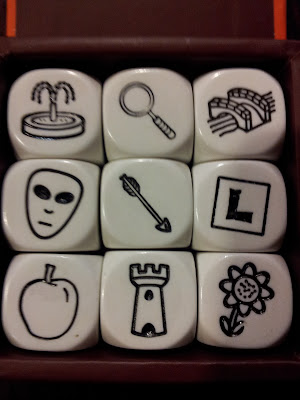
What else? Oh yes, to achieve this awesome goal, I’m going to use prompts. Anything from a random photograph, conversation, and yes my much trusted and used StoryCubes. Where possible, I will try and include the prompt, if someone feels they can do better, who am I to stand in their way?

This is running from today (2nd December 2012), until the 1st December 2013

Anyway, I’ve set up a category for my daily challenge, let’s see if on 2nd December next year I can look back and count 365 seperate posts in there.

In the meantime, a post is coming up with my first offering.

Also, if you want to find out a bit more about Flash Fiction (i.e. very short, self contained stories), there’s a wikipedia page to explain here, and here you can go read countless examples of the art form.


Ta ra folks.

Tools for NaNoWriMo 2012 (Writing)

As NaNoWriMo draws to a close I want to mention some of the tools I’ve used this year, and their pro’s and cons. I actually started this as a look ahead to what I would be using, but I got distracted by life and work, but I think it’s important.

As NaNoWriMo draws to a close I want to mention some of the tools I’ve used this year, and their pro’s and cons. I actually started this as a look ahead to what I would be using, but I got distracted by life and work, but I think it’s important.

This year I was hoping to not be caught in the Technology Trap™, (as happened last year). Now, as I can’t handwrite for toffee, I ended up caught right back in it. I decided that I wouldn’t do any writing on my phone this year, and concentrate purely on my computer. It meant fewer sync issues, and since I have a wonderfully touchable touchscreen laptop, I could use that for writing on the go, (space being limited on buses).

Unfortunately, last week I got hit by a lovely piece of Ransomware, that demanded money to unlock my desktop. Now me being hit by a virus is incredibly rare, despite not using virus scanners, other than Windows 7/8’s built in ones, I’ve not been afflicted by anything for a long long time. Worst I had was something that redirected my searches, and it was easily dealt with. I don’t even know how it got me, because I don’t do dodgy downloads any more, and the only sites I’d visited were for research this month, and the NaNo forums of course. Somewhere along the way, one of the pages I used for research must have gotten me. It doesn’t matter really, but it did rob me of two good days writing just when I needed them.

I fixed it, and it was time to carry on. I do want to use this story as a message though, back up often. If it had been something worse, and I lost my laptop for longer, or worst still it had done something to affect my files, (and I’m thinking of the documents my stories, and their preparation are kept in specifically), I would have been screwed. Back up often when you’re writing, whether it’s school/college/university work, or a story, or from your job. It doesn’t matter, it takes a few seconds to back something up occasionally  but it will save you pain and far more time later on, if something does go wrong.

Okay, back to the tools I’ve used this year, which has been a lovely mix of the digital, and the objects in the real world.

So, I’ll cover the digital orientated tools first:

  • Good old Netbook (currently the Dell Inspiron Duo, that transforms between a standard clamshell laptop and a tablet). Handy space saver, comfortable keyboard, with Windows 8, a nice big on screen keyboard, and it runs pretty fast.
  • Android Phone (currently the Samsung Galaxy S2, no physical keyboard sadly but on-screen keyboard solutions can empower word counts, plus camera and voice recording vital functions that can help a writer out)

I also have a tablet, however I choose to give that up this year. It’s filled with comics, and would have been easy to get distract by them.

Well that’s the electronic hardware for the software I’ve got another array of tools at my disposal that sit on my hardware:

  • Microsoft Word (PC) , hands down the best word processor by miles, for me anyway. It’s comfortable, and known, and stable – three absolutely vital features, I don’t want to be thinking about what I’m typing into when I’m trying to focus on writing.
  • Microsoft Excel (PC), I’m an Excel geek, I’ll openly admit that, I’m also terrible with numbers and mathematics ironically, so each year I use my Excel skills to track, analyse, and forecast as I go through NaNoWriMo. It works for me, so I’ll keep it going.
  • Microsoft OneNote (PC/Phone/Tablet), is handy tool for organising my research, all being well this year I’ll mostly just need to reference it, rather than spending a lot of time on research itself. Nice thing about Excel is that it’s available on all my devices.
  • QuickOffice (Phone/Tablet), is my home away from home. It gives me full word processing power on my phone, and limited spreadsheet functions. It’s not perfect, but it’s the best of what I’ve tried.
  • Box.com (PC/Phone/Tablet), has two purposes, it keeps me backed up, and allows me to access my writing from all my devices wherever I am. Plus it works directly with both Microsoft Word and QuickOffice so it’s convenient.
  • SimpleMinds Pro (Phone/tablet) – mind mapping software that has helped me organise my thoughts, and plot out new ideas.

Now, the electronic tools are great, and for obvious reasons they account for 100% of my word count, but not 100% of my creativity. Instead at least 20% of my creativity came from non-digital tools:

  • Pen and paper – the most obvious tools. I catch and store notes, write a couple of plans, experiment with an idea. Should I ever find myself completely destroyed by the Technology Trap™, I would drop to just this. I doubt I could do 100k of words in a month though.
  • Whiteboard and whiteboard pens (obviously) – I have two A4 white boards. I can scribble to my heart’s content, and nothing is permanent. Just wipe it off and do over. It’s also crazily invaluable when working with StoryCubes (see bellow).
  • StoryCubes – these deserve a post on their own. I love these little things, and if they’re something you think could help, I wholeheartedly recommend getting some. I want the other two packs. They help me break through parts where I’m stuck, and they help me develop entirely random plots.

Once upon a time, I would have just relied on writing, (whether pen and paper, or on a computer), and I never finished anything. I think I’ve gotten older, and five years of NaNoWriMo have helped me mature somewhat. I’m not a full planner, but the plans I do do, allow me to handle complex ideas, keep track of where I am, and where I’m going, and I don’t get stuck. I don’t get bored and wander off. Shiney things lose their lustre somewhat.

That’s technically not true, two of my NaNo novels are hanging this year, but they’ve not stopped, December will see a lot of work to plot out the specifics of their closing, and then actually writing it. I just didn’t want to spend a lot of time plotting in the middle of the month. They will be finished.

These tools of course are what work for me, everyone is different, and I hope you find the tools that work for you.

NaNoWriMo 2012 – a long awaited update

No Writing Fail Train for me this year (2012)

Usually during November I post every few days about my NaNoWriMo progress, that is until I crash and burn and end up riding the fail train until the end of the month, (though I did win last year). This year has been different, oh yes, on both accounts.

Usually during November I post every few days about my NaNoWriMo progress, that is until I crash and burn and end up riding the fail train until the end of the month, (though I did win last year). This year has been different, oh yes, on both accounts.

First of all I’ve failed to get round to inane blog posts about my progress until now, (now into the final week). Secondly, for the second year running, I missed the connection to the fail train and gained my win early. In fact at ten days, I was on the success train four days earlier than last year. That’s right, choo choo, I’m a winner again!

Okay, a grown man putting “Choo choo” in that statement may not sound like a winner, but it felt good, and so did winning.

This of course isn’t about rubbing all your noses in my success, (not entirely anyway), it’s about how I succeeded, and what I’m currently up to, (and no its not running round city centre bollock naked going running up to people before going shouting “Choo choo” in their faces – that behaviour gets you sectioned, and NaNoWriMo does not qualify as mitigating circumstances).

So, my last NaNoWriMo post before this, that was actually published, (have a whole post on tools that I didn’t publish, which is good as I went a different way), was all about my final decision for project this year. I originally had decided on three possibilities, and had a whole scientifically inaccurate way for deciding which I would go with.

Then October hit, and the Road to NaNoWriMo was in full swing, and I decided I didn’t want to do it. All that planning won’t go to waste, but it’s not being used right now. Instead I had a grand plan for revolution, with a Tyrant in Downing Street. I’m sure you can see the appeal of this given the times we live, and are likely to be living in in the future.  It’s tough, it’s exciting, and it’s political. What more can a guy ask for in a novel?

So with the planning session for the West Yorkshire chapter of NaNoWriMo, I plotted out my novel, sorted out my main character and time a line leading up to the main events. Then November the 1st at 2:30am (I napped longer than I expected), I got to work on the ambitious story I had in mind.

Another reason for choosing this particular story was I did it as a history book, narrated by a single voice, but telling many of stories of the life and times of said tyrant.  It meant I didn’t necessarily have to care about continuity, writing in the right order and what not, it’s going to be easy to chop and change in editing. Whole sections can be lifted and moved, or indeed just removed without impacting everywhere. It was quite liberating, so much so with a big first day, and a huge Saturday I was well on my way. I was hoping for a Wednesday night finish, (50k in 7 days, epic), however NaNo crud hit early this year and it threw me off my game somewhat in the first Monday and Tuesday of the competition. It was a distraction I could ill afford for the 7 day 50k. So, I didn’t do it. That said, it didn’t stop me, I carried on when I was better, and won on day 10. 5k a day average? I can live with that.

So November 10th was a glorious day, since I won. Unfortunately for my 100k plans, the story lost its traction after that. I’ve stopped it at 52k, and moved onto a new novel, with the aim of doing a second novel in 10 days. So far I’m behind after losing two days to the curse of technology, (my laptop by loathsome ransom ware).  The second novel got me to 100k in eleven days, and I completed the 50k for that particular novel on fourteen days.

Below you can see a chart of my word counts, per day, up until today. I did my best, but I was no where near consistent. (click the image to see the chart in full size).

From Word Counts

Neither is finished, but both need a bit of extra planning to tie it all together and finish off. So I’m calling December finishing month. There’ll be three to do, as tomorrow I’m starting another story. This one will be short, about 25k, just to finish off the last week. I’m not worried if I don’t hit 25k, it’s just a bit of fun.

The plot is entirely driven by StoryCubes, (see below for the selection in question). No idea how it’ll work out, and I’ll probably need more StoryCubes at various points to pad out the plot.

From Story Preparation

I have a whole post in mind as to how much StoryCubes helped me, and how I used them, and the fun. So I won’t share my interpretations just yet. I think though I’m going to do a StoryCube story once a month, just for fun.

It’s early yet, but I’d hate to forget, so here are the obligatory thank you messages.

Thank you to:

  • NaNoWriMo for hosting and organisation the month.
  • The Yorkshire chapter of NaNoWriMo for being such a lovely encouraging forum
  • #NaNoYorks chat room for its many word counts, and encouragements, and putting up with my plot talks, and occasional boasting.

In particular, I’d like to thank (in no specific order):

  • Sparkie, for whom I was desperately trying to race, but out paces me for writing with worrying ease – even hundreds of miles away in her new home.
  • Kerantli, for secretly being the organised and responsible one, and prodding me when I needed to stuff.
  • Rokk, for talks about Bond and plots.
  • BoredRobots, for being the foil to my personal story

A further mention goes to:

  • My colleagues at work that have put up with me talking about things they have not a single care about.
  • My mum for encouraging me, and my dad for taking an interest in the plot.

So yeah, plenty of thanks, and I’ve missed a lot of people out. Some people don’t even realise they’re helping, but they have. I could never have made it through NaNoWriMo these past couple of years without the care and support of all the other WriMo’ers I’ve encountered.

I’m stood here on this podium in tears now… but no one’s handed me an award yet. Ah well.

And the Winner Is…

From three possible NaNoWriMo projects down to just one. Now comes the hard work of building the notes, outlines and other preparation.

So, a few days ago, I mentioned that I’d got three possibilities for this year’s NaNoWriMo project. Well I’ve narrowed it down somewhat, to erm one.

I didn’t go through synopses of them all, I decided instead to think about what was involved in each, write a quick two sentence summary for each, followed by a game of pro’s and con’s. Lastly I performed a series of rankings against set ideas.

So first of all a reminder of the ideas:

  1. Retelling of the Count of Monte Cristo, brought into the post 9/11 age
  2. Continuation of the Crystal Rose Empires universe (follow up to my last NaNoWriMo novel) – a space adventure
  3. Rework of my magic time travelling novel from my first NaNoWriMo

I measured these three ideas as follows –

  • Ease: 2, 3, 1
  • Originality: 1, 2, 3
  • Challenge: 1, 2, 3
  • Length: 1, 2, 3
  • Knowledge: 3, 2, 1
  • Audience: 3, 2, 1
  • Fun: 3, 1, 2

And the winner is… 3 (using the alternate vote system).

Okay, I kind of already decided going to the vote. Option 3 has its short comings, I’ve been there but I’m starting from scratch, the original files are lost somewhere in my anarchic collection of backups. There are things I want to do to improve my original idea, and I’ve five years of accumulative experience to add to the fold.

So now it’s time to hanker down and make with the planning. So far I’ve got 13 characters, (first and second tiers – I’ll let periphery characters come and go as the need arises. Now I have some characters, I’m going to furnish them with details and start arranging them into scenes and chapters.

I’ve got a week to do this, and a little photography project to help storyboard and make the details readily available for when I start writing at 12:01am on November 1st.

Once I’ve got this done I’m going to walk away from the project and work on some short stories. One will be part part of this project – a short back story piece, the writing equivalent of one of the photographs. The others will be completely unrelated, plus there’s also the much needed, much delayed editing that’s needed. So I’m literary fresh for NaNoWriMo.

For the other two novel ideas, they’re going to happen at some point. I’ll probably restart planning the retelling of the Count of Monte Cristo during December with a view to getting started on writing during the Christmas holidays. Continuing the Rose Crystal Empires stories will be a Spring enterprise, and hopefully with proper planning I can do one of those a year has I’ve got some great ideas for where that universe will go over a series.

A Picture Says a Thousand Words

Melding the art of photography into the art of writing…

[singlepic id=63 w=250 h=188 ]

Photography and the Art of Writing

So, I have some money coming to me this September. It’s from my Grandparents, the last of which very sadly passed away last November. Now I’m choosing to think of this money as my final birthday present, it is after all my thirtieth birthday in September. So, having put some thought into what I wanted, and they would have liked to give me, I decided on a camera. A reasonably powerful camera.

My Granddad loved taking photos, and they had lots of them. My Granddad even had a really expensive camera once, which was a shock to my dad and Nana when he brought that home. He may not understand the modern bells and whistles, but I think he would like modern cameras.

Anyway, so the camera is quite a personal thing. However, it’s also about writing. I’ve been using camera’s to help me write for some time. It all started off a few years back when I took a photo of Primrose Valley, (the one in Leeds, not on the East Coast), and wrote a story around it.

Since then, I’ve used photographs, and photography as a tool in a number of ways, some small, some large. It’s a handy tool to keep around.

Now, first of all, if anyone feels like following my usually terrible advice, you should know, it doesn’t matter how good or bad you are at taking pictures for this. I’m really bad – especially when I use my camera phone, (see the picture with this post).

There are all sorts of things to consider when taking a photograph, and you only have scant minutes, if that, to be ready to take it. I do my best with things like lighting, focus, composition and such – and if I get a new camera I’ll be really trying to get to grips with all that stuff. As a writer though, you don’t really need to worry about it.

As a writer what you need from photographs might be:

  • A catalogue (for description) of:
    • Things
    • People
    • Places
  • Ideas (inspiration)
  • Basis for story boards (planning)

Description

If you’re anything like me, (and there are some people out there that might be), you might struggle to do descriptions. I’m too busy writing to think about how something looks, it’s a distraction when in the flow of writing really. I mean, getting descriptions right is a very delicate work, and if you forget if a pattern had a green stripe over a blue, and instead go green over red, that’s a basic mistake that’s easy to miss in editing.

My solution is, as I write, I have in mind pictures, either from my anarchic photos folder, or from pictures, and clips online, stick them in a OneNote (or whatever your visual notebook of choice is, online or off), with a  note to who it relates to, and when. Then you can come back to it, in a quiet moment and give some definition to your very basic description.

This is great, because you can then sync up all your descriptions, (without repeating the same words), in such a way as you don’t contradict yourself.

This is probably the most useful reason for photography, and to be honest it really doesn’t matter if you take the photos yourself. I think it’s good to though, you choose the cars you want in your portfolio, the buildings, the rooms, the clothes, and the people. Google Images works just as well though.

Ideas

So, I’m not infallible, I have really fantastic ideas. I mean blow your mind fantastic ideas, but a lot of them never become something I can actually use. They’re too disconnected from reality, or their too real they’re mundane. Maybe I have a great concept, but nothing that really makes it concrete.

I need ideas to to tie it to, pictures are great for that. They give a bare bones idea some fleshy substance. Where I have a scene or a plot but no characters, I can have a visual representation of one. Maybe I’ve got a character, but no world for them, well I can pick some scenery shots, or a building, or maybe just a car, whichever, the character now has a universe, no matter how small. It’s something for the idea to interact with, which means it’s less likely to fade.

In my most recent NaNoWriMo Project, the Arsène Frassin space adventure, somehow I ended up with just two female characters in the whole thing. Not intentionally, I’d like to thinking I’m not a male chauvinistic pig, it’s just where the story went. However in editing, I’m going to insert a few female characters, and it’s helped to utilise images, (that I got from Google Images, wandering around taking random up close shots of women, won’t help you with your career as a writer, unless you want to write from behind bars),  to try and find suitable characters to a heavily male dominated universe.

Story boarding

Now, this one is new to me, but I definately see the potential. I’m on my big planning kick for the past couple of years, one of the things I want to try for NaNoWriMo 2012 is to not just have an outline, but a story board. Here I’ll already have key images set up, and laid out in reasonable order that progress with the story. Instead of hastily searching round for a descriptive picture I need to use later, I’ll have it to hand so maybe I can be more descriptive in my first draft.

Now, for stroy boarding, I can’t draw for toffee. Just a few very simple sketches, and maybe a technical drawing or two, but I can use photographs. Handily, for this year’s NaNoWriMo project, two of my three choices are set in the present day, which means I can take photos of places, people, fashions, and things that will be relevant to my novel. For the space option, I’ll have to get more creative, a combination of a visits to the Royal Armouries in Leeds, airports, and suh can fill the gap in the futuristic sides of the novel.

I’ll need shots of as many people as possible to drill down to my core characters, and same with palces and things. Always take too much, you can filter out what’s there to the essentials you need. Which is true of many things in life, to be fair.

So, once I’ve got all my pictures ready, using the outline, I can use OneNote, or Word, or Publisher, or my whiteboard to layout a story board and put the pictures on it. Choosing a picture to represent the core aim, location, character, or event for each chapter, or scene. If you want to get complex, (and let’s face it, I’m a complicated guy, so I do), you can do varying levels of story boarding. Starting at the overall plot, then each layer goes into more and more detail.

Before you think I’ve gone nuts, I should point out I’m a Business Analyst, and this is often how I go about designing process maps. So it makes sense to me, if you want to do a story board, find the way that makes most sense to you. Which is true of any advice you find online, or in books, or the random drunkard who once wrote a story long before he became a alcholhic, and insists on telling you how the best way to do it is.

Lastly

I mentioned, you don’t have to be particularly good, and that’s true. You don’t need a fancy schmancy camera for this, the camera on the phone will do just as well, (and whether you’re on iPhone, Android, or Windows Mobile there’ll be great apps for cataloging your photographs). That’s how a lot of mine get taken, from my phone, though I do prefer a proper camera when I can, sometimes the perfect thing that needs capturing is at the time you’re least likely to be carrying a camera. Make do, having the photo is better than not having a photo because you couldn’t have taken it perfectly.

I should add a note of caution, make sure you don’t appear like a peeping tom, it’s no good sticking your lens into people’s homes without permission for instance, and it’s no excuse for stalking.

And one final bit of advice, get a couple of high resolution crowd shots, within those crowds should be a mix of gender, ages, race and other cuts of society. When you’re stuck for inspiration for a character, get out the picture and point at one at random, then see if you can work them up into a character, complete with physical appearance and description. It’s a bit like people watching, only more convenient when you’re at home on your computer writing.

Happy snapping, and happy typing to you all.

P.S. I included that particular photo for a reason, aside from getting the law of thirds very roughly right, getting lead-in lines, it was done on my camera, and came out blurry, which is unimportant, it’s a great item for the story board for one of my ideas. Plus it didn’t contain any people, so I couldn’t offend anyone.

Road to NaNoWriMo 2013 starts here

The Road to NaNoWriMo 2013 has officially commenced, and already the first road block is in the way, what to write? I’m down to three choices, all very different, and now I need to choose.

So I’ve been a bit quiet on here for a bit too long – the same is true of my writing.

After my success at NaNoWriMo 2011,and personal difficulties during and after, I wanted 2012 to be a significant year, unfortunately I stalled on editing my NaNoWriMo novel. It needs a serious re-write to turn my main character into a bad guy, with sympathetic qualities who reluctantly becomes the hero the universe needs, from where he was in the first draft which is a good guy in a bad guy’s job.

I know what I needed to do, but I choked for now. I will come back to it later on I’ve decided.

But choking doesn’t stop there, aside from a couple of false starts I’ve not written anything original. I have however had some great ideas, which is what I’m going to write about now.

You see, one of the things that helped me last year was the planning I did for my novel. I may not have ended up following the exact plan, but I had enough of an idea about where I was going that I was able to do 50,000 words in two weeks, and finish the story around 75,000 within three weeks. I learnt something, I’m not good at ‘pantsing’, (writing by the seat of your pants). So this time round I’m considering several possible stories, and doing my best to outline them.

Before I get into what my ideas are, I should mention targets. This year, for NaNoWriMo, I’m going to completely aim over the top. My personal target for the month of November will be 125,000 words. It’s doable, my daily word rate for the three weeks was 3751, to hit 125,000 in 30 days would be 4,166. Not a huge stretch, but it won’t leave much time for stopping and struggling for the next idea needed to keep the story moving. So planning is going to be key, and this year I’m trying to plan better.

I have three possible novels this year:

  • Firstly, one I’ve wanted to do for a while, a modern retelling of the Count of Monte Cristo, set in London, Paris, and New York. The world is primed for it, and can fit around the events of the novel to really come alive. Downsides, what I have in mind is quite complex, easily 125,000 words, but a lot of is nitty gritty detail of the revenge operations.
  • Secondly, a continuation of the universe created in last year’s NaNoWriMo novel, involving a new protaginist, a new antagonist, a wholly different adventure that might, or might not run consecutively, or concurrently to the original story. Challenges, 125,000 might be a bit long for a space adventure novel of the type I write.
  • Thirdly, a complete restart of my first NaNoWriMo novel from back in 2008, I’ve learned a lot since then, I never actually got it finishedm (though I hit the 50,000 mark just), and I think about it alot. Goal, to fully re-imagine the story to make it easier to read, give the characters more history and depth, and give them more urgency – 125,000 words might be long, but it gives me a chance to explore the nature of the world.

At this stage I’m not sure which I’m going to go with – I’ve already started outlining the Monte Cristo project, but I realised it’s possibly too much for NaNoWriMo – I know a lot can be done in editing, but I would really want to get in the revenge plots as well as I can and just need to clean them up for the second draft. It involves really looking at ways you can screw over bankers/investors/hedge fund managers and the like, and achieve a satisfactory level of revenge.

The others would be easier on many levels, the space pirates universe is easy to write for, it’s largely pulp fiction, with easy rolling story lines, multiple arcs that intertwine, but fun as well as there’s politics, dubious motives on characters and nations. The rework of my 2008 NaNoWriMo is easier because I know the story, certainly the first three quarters, and I’ve got great ideas for thinking about, (imcomplete projects are rarely far from my mind).

Once I’ve gone through the Pro’s and Con’s of each idea, I’m going to write a summary, (just a line or two for each about the principle character(s), the situation, and the goal), and if after that I still can’t decide, I’ll have to go all out and do a synopsis of some description for each one.

The great thing is, which ever two I don’t do for NaNoWriMo can be my projects for the 334 days after NaNoWriMo. I’ve got time booked off this Christmas, (usually I work except for the bank holidays), so I think that’s a good time to start my first post NaNoWriMo novel.

I turn 30 this year, so I’m determined that this year will be the turning point where I knuckle down and not get distracted from….

Ooh look shiney!

Sorry, I won’t get distracted from my writing.

With even more planning going into this year’s novel, I’ll hopefully have plenty to say. Plus, I’ve some other ideas for articles that would be worth exploring… so you might just be stuck with me for a bit.

Tools for NaNoWriMo 2011 (Writing)

The Technology Trap™ is where seemingly productivity enhancing tools aren’t actually productive at all. This can be through misunderstanding of the purpose of a piece of technology, inappropriate training or education for a piece of technology, or through design flaws and errors in technology.

My problems were the latter, I wanted to be able to write on my phone and on my PC. Surely there must be an app for that right?

This post is a little delayed, but that’s a good thing as my NaNoWriMo project this year nearly got caught in the Technology Trap™.

The Technology Trap™ is where seemingly productivity enhancing tools aren’t actually productive at all. This can be through misunderstanding of the purpose of a piece of technology, inappropriate training or education for a piece of technology, or through design flaws and errors in technology.

My problems were the latter, I wanted to be able to write on my phone and on my PC. Surely there must be an app for that right?

Congratulations there was, a nice simple little app called My Writing Spot on Android. It had word counts in the file list of the app, and in the Web application on the PC (the latter being better as it gave you word count per file and for the whole project). The website is My Writing Nook. It’s very good in theory, you write in a series of text files (which means no complications from unnecessary functionality at this stage of writing and if you’re worried about spell checking, most browsers handle this natively, and auto-correct on your phone when it’s not in a DAYC mood will take care of spelling there), when you click save the file is stored on a protected area of your Google account and is ready for your other device to pick up when it syncs. Now syncing is the best way – but it’s also where My Writing Spot falls down in its current version – the syncing is imperfect and at points you could be syncing over and over until the file moves from your phone to appear on your computer screen and vice versa. You nervously delete it from one, and hope that works, you make umpteen copies just in case.

All this lost time, and concentration becomes a distraction from writing. I finally gave up on it when one night I ended spending a several hours trying to sort it.

Since then, I’ve switched back to good old trusty Microsoft Word when on my laptop on my mobile where I still want to write I’ve gone with QuickOffice which allows me to work on the same file and I could easily view and add to my Excel tracker for NaNoWriMo.

That’s fine with me, except I don’t want to be emailing files several times a day, it’s too inconvenient. So I signed up to Box, they are already integrated into QuickOffice, but they also have a plug in for Office so I can in effect open from and save to my account fairly fast, and then do the same from my mobile.

Even there though was a Technology Trap™, early on with QuickOffice, it crashed while saving to my Box while the signal was a bit intermittent. Lost a few hundred words (I should say this for My Writing Spot, I never lost any actual words just time). Since then I open the file save it down locally and when I’m ready for the PC I save it back to my Box. Haven’t had a problem since of that kind and it doesn’t really take much time more..

QuickOffice isn’t perfect, it doesn’t handle Swype well, but I’ve changed Android keyboards since which I’ll come on to shortly.

So to summarise the majority of my writing is done in Microsoft Word with stuff during commute and breaks at work is handled on QuickOffice – it’s worked for me for the last half of NaNoWriMo.

Another thing that’s made a big difference to writing on my phone has been Swype, it was a lot faster than typing – though it could get annoying at times not recognising what I was trying to say. When I was using My Writing Spot this wasn’t too bad, as I could press the Swype button and it would offer alternatives. The button doesn’t work like that in QuickOffice which was annoying, (it does do this automatically when it’s not sure first time – the issue is when it thinks it got it right and didn’t).

I have since changed keyboards to one called SwiftKey which uses Natural Language Processing to predict based on your historical typing what words come next, a bit like T9 and its derivatives but predicts further ahead. It means you can say more with fewer key presses. It’s taken me some time to get used to typing rather than swiping my way across the screen but it’s actually pretty good at what it does, (however since the most recent update of QuickOffice it annoyingly doesn’t work as well, with several faults in interaction between the two).

I’ll see how it does at writing fiction later, but it is doing okay with blog posts and text messages. Though, as I mentioned, there are a couple of issues with QuickOffice since the most recent update of the software.

Other tools I’ve found invaluable are covered below split between mobile, PC, and real world tools. Some of these may have been mentioned in the planning post, but I list them here as they are also vital to my writing process this NaNoWriMo.

Mobile apps (on my Samsung Galaxy SII with Android 2.3):

  • Thinking Space – mind mapping software for Android with a rough around the edges file syncing system. Most of my planning was stored in Mind Maps, meant it was easy to find and reference the information I stored there, navigate my plot plan and get my story roughly back to it. Thinking Space is the only Mind Mapping software I’ve tried for Android, but it does the job very well. It’s a lot easier to use than PC versions I’ve tried.
  • Fake Name Generator – based on criteria you select it generates a random name and identity information. It generates a lot of points of information such a national conforming phone number, email address, date of birth (gives you age as well if you’re not interested in DOB), occupation, fake credit details, fake website, and vital statistics like height weight and blood type. I have spreadsheets with thousands of fake details like this but it’s handy having an app that generates and does so by gender, ethnicity, and language. I tried two or three from the market this one worked best for me. It does require an internet connection to generate but you can save the identities you generate to access later without a connection.
  • Task – a generic app that came already installed on my, however I used it to craft an initial timeline based on my Excel forecasting as to when I would get to particular sections, and notes to remind me to do things when I did. However, after the first few chapters I gave up trying to divide my work as I went, and decided to do chapters in editing. However this was no fault of the app, and I will use it again because it has a relatively simply to use interface. I’ve looked on market, it’s not there, but there are alternatives.
  • Dolphin Browser HD – There are a lot of options for a browser, but if you’re writing in the wild, it’s handy to have internet references in the wild, and I find I get less distracted by the inconsequential when on mobile phone than when I’m at the PC. However there quite a few options for non-stock browsers on Android, I choose Dolphin Browser HD not because it’s the fastest, or because it does the most, but because it’s a good all rounder and handles complex sites fairly well. I also appreciate the interface most of the time, the sliding menu and favourites bar for instance are handy most of the time, unless they accidentally pop out at random.
  • QuickOffice – Which I’ve already mentioned, it does everything I need, except work consistently with custom keyboard technologies. However even those problems aren’t insurmountable.

PC applications and websites (on my Dell Inspiron Duo with Windows 8 Developer Preview):

  • Microsoft Office 2010
    • Microsoft Word – I’m a long time Microsoft Word user, I remember going way back into the days of DOS. I’ve grown up with it, I was educated on it, and have educated others in it. So out of all the free versions out there, I’ll still opt for this every time. I say this to admit my bias when I say this is the best Word Processor available bar none. Everyone however is entitled to their own view of this, but I like the things Microsoft does well, and better than the competition, and I like the idiosyncratic things they don’t. However to summarise it in an unbiased way, it accepts words in a variety of languages, has custom dictionaries, can do macros if you like for to automate common functions (I like having a short cut for adding page breaks), the newer versions have the ribbon, which I hated initially but have grown to enjoy for the most part, especially with a touch screen.
    • Microsoft Excel – For all your spreadsheeting needs, there’s nothing better. I am however a power user, and fill spreadsheets with macros, and charts many of them created or customised by me.
    • Microsoft OneNote – I use OneNote to store all my more detailed notes, web page clippings, random notes, and samples
  • FreeMind – is a free Mind Mapping software for the PC, which works with files from Thinking Space on the android phone. I mostly use it for reviewing on a larger screen what I’ve done on the mobile.


So there you have it, a brief over view of the tools I’ve used for NaNoWriMo 2011. I’m going to try out a different set of tools, and some different methods for going about my writing, to give me something to compare to. Also, while I acknowledge my favourites here, I am open to something better being out there, as long as its a tool that works with the whole process with minimum fuss.

I’ll do another post in the new year to let you know what I’ve chosen to try, and how it has gone. In the meantime, suggestions wouldn’t be unwelcome.


NaNoWriMo 2011 – From Week Two to the End

NaNoWriMo 2011 week two, or as I shall hereby refer to the 45th week of 2011, ‘ The week that won it’.

I’m sure you can guess why, if you can’t, or even if you can because I want to show off, as of Sunday 13th November I hit 50,000 words (50,443 to be precise). Can’t validate until the 25th November, but still after falling short two years running, to hit a second week finish feels great.

I can tell you, it was quite a buzz to hit the 50,000 mark, and I didn’t stop there. Week three saw me push on with the aim of hitting 75,000 words, including “The end.” Want to know how that went? Well I did that too. Though, it was a bittersweet second victory, someone I loved dearly passed away on the Saturday, and I contemplated on just stopping with 8,846 words still to go. That wasn’t the memory I wanted to have of someone I love passing, and though it was a slog, I finished at 75,114 on day 21.

So, the last step of the immediate NaNoWriMo process is to validate your win. And I did.


So there you go – I officially win this year’s NaNoWriMo. I have a badge to prove it.

However, I have decided that there is more to NaNoWriMo than simply writing 50,000 words though – that’s goal number one, with a couple of sub-goals that are worth noting. Below I’ve listed important steps in the writing process as I see them right now, (I reserve the right to grow as a writer and evolve these later*).


Continue reading “NaNoWriMo 2011 – From Week Two to the End”

Tools for NaNoWriMo 2011 (Planning)

So I’ve talked about the planning I’ve done and am still doing for NaNoWriMo but not about how I’m going to be working.

First of there’s how I’ve done the planning. There are obvious tools such as the browser I’ve done online research from (Firefox on my PC, and Dolphin Browser on my phone), and then sites such as Wikipedia,  space.about.com, and news websites (for the latest science and technological developments and theories). Nothing ground breaking there, I’ve been using a lot of science based sites to flush out details I can populate my universe with, but some sites on the history of piracy, and 16th, 17th, and 18th century naval life.

That’s all great but once I’ve got it, whether it’s snippets or whole articles I need to store it so that I can access it again, preferably offline so I’m not distracted by the internet later on. For this I use Microsoft Office OneNote – something I’ve had for ages but never gotten round to exploring for writing. It’s good, I’ve two projects on there, one for all that juicy research, the other for character bio’s and scene/locales.

I’m also using an app on my phone called Thinking Space (I’m using the pro version, but the free version doesn’t restrict you other than listing some screen retail to ads). This is a mind mapping (or brain storming if you want to call a spade a spade) tool, it’s a lot lower on detail than one note but has the advantage of quickly summarising thoughts and ideas and showing how things are interconnected. It’s in Thinking Space I’ve also mapped out the structure of the story, so I can clearly see what each chapter needs to include to feed events four or five chapters further into the story, and ultimately the end. Hopefully it means no loose ends at the end, and if I can keep it up to date it gives me a to-do list of changes I need to make in editing if things happen later in the story that weren’t originally part of the plan and need supporting events.

Other basics in the planning stage include Microsoft Word, Notepad, and a calculator. Then there’s my Kindle, where I’ve been reading plenty of similar sci-fi, and piracy novels. They’d also a few travel guides on there as this is an interplanetary novel each location needs to be distinct but something that can be related to by the Earth found denizens of today’s earth. It helps to borrow from out countries, cities, and cultures to enrich my fictional universe, lest everything in the universe somehow looks and feels like Leeds.

Add into that Google Sky Maps, Google Translate, and we’ve pretty much got everything I need for a space based science fiction story.

These are the tools I’ve used fire the planning, and they’ll be reused in the writing stage, but added to by things that are geared to better improve my writing, speed me up, andkeep me going. I’ll cover those in a subsequent post dedicated to that subject. I’ll do one in January to show the tools I’ll use to edit this story. For other novels I’ll try different tools and review them.

Nanowrimo Day One

Day one… is done.
I’m not going to bore you and me with daily NaNoWriMo updates – I’ll keep it weekly.  However as the first day is over, I thought I’d give it a start.
So my thoughts on my NaNoWriMo project so far – I suck. Okay, it’s not that bad, I’m  well past the 1,667 word standard target for day one, however I wanted to blast it. My  personal schedule called for 6,000 words. In the end, when I finished last night I was  at 3,062 words. I should be happy with that, but I’m not.
See the problem is, I got home from work, (and I’d been successfully writing on my  phone on the way home), and just went pfft. I got distracted by the interwebs,  television, food, reading the news. So what I need tonight is a digital coccoon to stop  this happening again. Going to need it to, as I’d really like to make the Herculean effort  to get back on track, (according to my schedule for the early push by the end of today I  need to be pushing 10l to 11k). However, that’s probably not reasonable, so if I write  6,000 words today, I will allow myself to get back online. Though from this point  onwards I’ll only be recording the shows I like, I’ll wait until I hit 50k to watch them, (I  actually prefer watching multiple episodes back to back anyway, you get to to see arcs  developing better than if watching them one by one.
After today the schedule, aside from weekends, becomes a lot less punishing – that’s  why a good strong early push is so important.
Okay, aside from my crap ability to focus after a days work, and my inability to resist  the temptation of other forms of entertainment,  the story itself is going pretty good.  I’ve got a pretty good idea where I’m going still, we’ve not gone completely off plan  (though I used more words than I anticipated in the first section – I can easily see in  editing that the word count in that chapter alone will drop 25-50% but I’m not too  worried about that now). I’m now on the second chapter, and I’m pushing hard at the  world building, because chapter one was too limiting an environment to build up the  world the story takes place. Chapter two is a little cruise, several meet and greets,  and  just a tinge of excitement, as a preview of what is to come as the story progresses to  the thirdhalf way point.
That’s actually a little bit of an issue, but again I’m pusing it aside until the editing  process – I think the plan I have flows pretty well, but it does trouble me that the main  events of the story line don’t happen till late on – with feeder events earlier on building  up to it. However, if it doesn’t work I’ll worry about it in editing, because it’s too late to  go back now, and if I go off plan I’ll probably lose the thread in my head.
This of course makes sense to me, but I offer no guarentees anyone else will  understand a word of this.
So, do I feel confident after just one day? Despite not being where I want to be, the  likelihood is I will finish this year, I do have a plan, I’ve got a cast of characters, yet still  there’s plenty of room for my own creativity.
I was going to throw in all sorts of random stats, such as I’ve spent around 4 hours 37  minutes writing, currently averaging 15 words per minute (including the time I’m sat  looking at the screen trying to motivate myself to put words down), at my current rate  there’s 59 hours writing to go, and as things stand now (with only a part day done on  the second day),  should finish on or around the 27th November), however I just could  find a seemless way to fit them into this post, so you’ll have to wait till I’ve got a few  days worth of stats.